
WordPress SEO Services: Speed, Structure and Rankings for WordPress and WooCommerce Sites
WordPress SEO services from a specialist who works inside WordPress every day: the technical setup that themes and plugins get wrong, site speed and Core Web Vitals, on-page structure, schema markup, content strategy, WooCommerce product and category SEO, and the hosting and maintenance decisions that affect rankings. One accountable specialist, fixed monthly fees, weekly written reports, no long contracts.
What WordPress SEO services cover, and why the platform needs its own approach
WordPress runs a large share of the world’s websites, which is exactly why WordPress SEO is its own discipline. The platform is flexible enough to be configured badly in a hundred ways: themes that print two H1 tags, page builders that bury content in scripts and inflate page weight, plugins that create duplicate archives for every tag and category, attachment pages that index a URL for every uploaded image, caching that is installed but not configured, and hosting that turns a three-second page into an eight-second one. None of that is visible in the dashboard, and all of it caps what content and links can achieve.
WordPress SEO services, as offered here, combine general search engine optimisation with the platform-specific work: a WordPress SEO audit that reads the theme, the plugins, the hosting and the settings as well as the pages; technical fixes for the archive, media and URL problems WordPress creates by default; site speed and Core Web Vitals work across caching, images, code and hosting; correct configuration of the SEO plugin rather than trusting its defaults; schema markup for the page types that earn rich results; a content strategy that uses WordPress’s strengths; WooCommerce SEO for stores; and safe handling of migrations, redesigns and theme changes. The work is done with editor or administrator access to your own site, reported every week in writing, and priced as a fixed monthly fee.
This page sets out what the service includes, who it suits, the WordPress-specific problems found on most sites, how speed is fixed, how WooCommerce stores are handled, which plugins matter and which are bloat, what hosting and maintenance have to do with rankings, how migrations are protected, what it costs in pounds and dollars, how a specialist compares with a plugin, a developer or an agency, and the questions WordPress owners ask before they commit. The free audit at the bottom of the page is the normal starting point: a written summary of the technical, speed and content problems on your specific site.
The WordPress sites that need specialist SEO rather than another plugin
Business sites built on a theme or page builder
- Looks good, ranks nowhere: heavy templates, slow load, weak structure, thin service pages
- Needs the technical clean-up, speed work and page rewrites that turn a brochure into a ranking asset
WooCommerce stores
- Hundreds or thousands of products with duplicate descriptions, indexed filter URLs and slow category pages
- Needs product and category SEO, schema, crawl rules and speed work built for stores
Sites with an SEO plugin and no results
- The plugin is installed, the traffic lights are green, and nothing has changed
- Needs the plugin configured properly and, more importantly, a strategy the plugin cannot provide
Blogs and publishers
- Years of posts, tag archives, author pages and category duplicates competing with each other
- Needs a content audit, archive strategy and internal linking that turns volume into authority
Sites that lost traffic after a theme change or update
- A redesign, a new theme, a builder switch or a plugin update changed URLs, headings, speed or indexation
- Needs diagnosis against what changed, then repair
Agencies and developers
- Web designers who build WordPress sites and need SEO delivered for their clients
- White-label audits, launch checklists and ongoing SEO under your name
The full list of WordPress SEO services
WordPress SEO audit
A crawl of the site plus a review of the theme, plugins, hosting, settings and Search Console data. It finds what the platform is doing to your rankings: duplicate archives, attachment pages, heading problems, builder bloat, slow templates, bad permalinks, missing schema, misconfigured SEO and caching plugins, and the content gaps against competitors.
- Technical, speed, content and plugin findings in one written report
- Ranked by impact and effort
- A fix list for you, your developer or the specialist
Technical WordPress setup
Permalink structure, category and tag archive rules, attachment page handling, author and date archives, pagination, canonical tags, robots rules, XML sitemaps, HTTPS and www consistency, trailing slashes, feeds, search result pages and the other URL types WordPress creates without asking. Fixed in the SEO plugin, the theme or the server as appropriate.
- Indexation limited to the pages that should rank
- Canonicals and redirects consistent site-wide
- Sitemaps that list only indexable URLs
Site speed and Core Web Vitals
Caching configured properly, images compressed and served in modern formats with lazy loading, scripts and styles minified and deferred, unused plugins removed, fonts optimised, a content delivery network where it helps, database cleaned, and the PHP version and hosting reviewed. Measured with field data from real visitors, not just lab scores.
- Loading, interactivity and visual stability targets met on mobile
- Template-level fixes so every page benefits
- Before and after measurements in the report
On-page structure and schema
One H1 per page, headings that follow the content, titles and meta descriptions written for clicks, image alt text, internal linking, breadcrumbs, and schema markup for organisations, local businesses, services, products, articles and FAQs, added through the SEO plugin or the theme so it survives updates.
- Page-by-page optimisation in priority order
- Structured data validated after each change
- Templates fixed for scaled improvements
Content strategy for WordPress
Keyword research mapped to pages, posts and categories; a content plan that uses WordPress’s strengths, fast publishing and flexible structure, without its weaknesses, thin posts and duplicate archives; briefs for your writers or content written for you; and internal linking that connects posts to the service and product pages that earn money.
- Service and category pages first
- Editorial calendar for posts that support them
- Content audit and pruning of what drags the site down
WooCommerce SEO
Category page content and structure, product titles and descriptions that are unique enough to rank, product schema with price, availability and reviews, filter and variation URL rules, pagination, out-of-stock handling, image optimisation for product galleries and speed work for the templates that stores make heavy.
- Category-first keyword strategy
- Crawl and index rules for filters, sorting and variations
- Speed on cart, checkout and category templates
Plugin configuration and clean-up
The SEO plugin set up correctly: titles, metas, archives, sitemaps, schema, breadcrumbs, redirects. The caching plugin tuned rather than installed with defaults. Plugins that duplicate each other, slow the site or add nothing removed. Fewer plugins, correctly configured, is the goal.
- SEO and caching plugin configuration documented
- Redundant plugins identified and removed with your approval
- Update and compatibility checks
Hosting, security and maintenance advice
Hosting affects speed, uptime and crawl behaviour. Security affects whether hacked pages appear in search. Updates affect whether a plugin change breaks canonicals overnight. The service reviews all three and gives clear recommendations, and monitors the SEO effect of every update.
- Hosting and PHP recommendations
- Security checks that matter for search
- Post-update SEO checks
Migrations, redesigns and theme changes
Moving to WordPress from another platform, changing theme or page builder, restructuring URLs or merging sites, planned so rankings survive: URL mapping, redirects, template checks, staging audits and post-launch monitoring.
- Migration plan and redirect map
- Staging site audit before go-live
- Twelve-week recovery monitoring
Local SEO on WordPress
Location and service-area pages built correctly, local business schema, Google Business Profile optimisation, citations and reviews, and the on-site signals that tie a WordPress site to a place, for single and multi-location businesses.
- Location page templates that do not duplicate
- Local schema per location
- Business Profile and citation work
AI search visibility
How the business appears in AI Overviews, AI Mode and chat-based assistants, and the entity, content and structured data changes on the WordPress site that improve it, covered inside the strategy.
- AI visibility check for buying questions
- Answer-ready page structure
- Consistent business details across the web
Reporting and support
A written report every week: what was done, what moved, what did not and what is next, with the numbers from your Search Console and analytics. Questions answered as they arise, and a quarterly review of the roadmap.
- Weekly written reports
- Quarterly strategy reviews
- Direct access to the specialist
How WordPress SEO is delivered, from audit to rankings
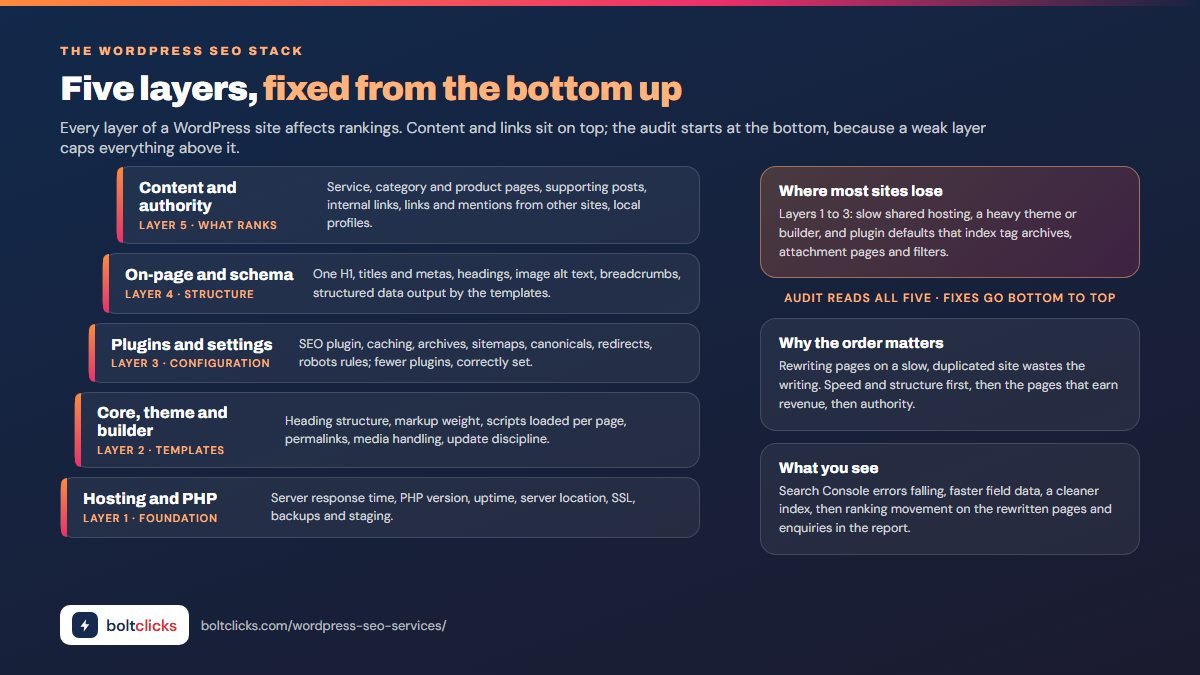
- Free audit summarySend the site and the searches you most want to win. You get a short written summary of the biggest technical, speed and content problems on your WordPress site and whether specialist SEO is worth funding.
- Full WordPress SEO auditCrawl, Search Console, speed data, theme and plugin review, hosting check, content and competitor review. Findings ranked by impact and effort with a fix list.
- Technical foundationArchive and URL rules, canonicals, sitemaps, robots, redirects, heading structure, schema and plugin configuration fixed first, because content built on a broken foundation is wasted.
- Speed and Core Web VitalsCaching, images, scripts, fonts, database and hosting tuned until field data on mobile meets the targets; template-level fixes so every page benefits.
- Pages that earn revenueService, category and product pages rewritten and structured for the searches mapped to them, with internal links and structured data.
- Content and authorityPosts and guides that support the money pages, published to a plan; outreach, digital PR, citations and Business Profile work for the links and mentions that build authority.
- Monitoring, reporting and maintenanceEvery update checked for SEO regressions, every week reported in writing, the roadmap re-planned each quarter.
The WordPress SEO problems found on most sites
WordPress creates URLs, archives and markup automatically, and most of it is invisible to the site owner. The audit checks every one of these, because each one either wastes crawl budget, dilutes relevance or competes with the pages you actually want to rank.
| Problem | What WordPress does by default | Effect on SEO | Fix |
|---|---|---|---|
| Tag and category archives | Creates an indexable archive page for every tag and category, often with the same excerpts as the posts | Hundreds of thin duplicate pages competing with your posts | Noindex thin archives, keep and optimise category pages that have real demand, prune unused tags |
| Attachment pages | Creates a page for every uploaded image with the filename as the title | Empty pages in the index; image URLs ranking instead of content | Redirect attachment pages to the parent post or media file |
| Author and date archives | Indexable archives per author and per month | Duplicate listings of the same posts | Noindex, or disable on single-author sites |
| Multiple H1 tags | Themes print the site title or the page title as an H1 in addition to the content H1 | Confused page topic signals | Theme setting or template change so each page has one H1 |
| Page builder bloat | Builders wrap every element in layers of markup and load their own scripts and styles on every page | Slow pages, poor Core Web Vitals, content search engines struggle to weigh | Optimise builder settings, remove unused features, rebuild the heaviest templates where necessary |
| Permalinks and trailing slashes | Default or inconsistent URL structures; both slash and non-slash versions served | Duplicate URLs and split signals | Post-name permalinks, one canonical form, redirects for the rest |
| HTTPS and www variants | Four versions of the site can respond unless redirects are set | Split authority and mixed-content warnings | Single canonical host with 301 redirects and HTTPS everywhere |
| Search result and feed URLs | Internal search pages and feeds can be crawled and indexed | Infinite low-value URLs | Noindex search results; leave feeds for readers, out of the index |
| Pagination | Paginated archives and comment pages create page/2/, page/3/ and comment-page URLs | Crawl waste and duplicate signals | Self-canonical paginated pages, comment pagination disabled |
| Plugin conflicts | Two SEO plugins, two caching plugins or a theme that also outputs schema | Duplicate meta tags, conflicting canonicals, broken caches | One plugin per job, configured, the rest removed |
| Sitemap content | Sitemaps list every post type, taxonomy and media item | Search engines pointed at pages you do not want indexed | Sitemaps limited to indexable, valuable URLs |
| Uploads named IMG_2041.jpg | Filenames and alt text left as the camera set them | No image search visibility; accessibility gaps | Descriptive filenames and alt text on the images that matter |
WordPress speed optimisation and Core Web Vitals: where the seconds go
Speed is a ranking factor, a conversion factor and, on WordPress, usually the biggest single technical problem. A default WordPress install is fast; a business site with a premium theme, a page builder, twenty plugins, unoptimised images and shared hosting is not. Core Web Vitals measure what the visitor experiences: how quickly the largest content appears, how quickly the page responds to a tap, and whether the layout jumps around while loading. The targets are met by working through the layers in order and measuring with field data from real visitors on mobile devices, because lab scores flatter sites that real users find slow.
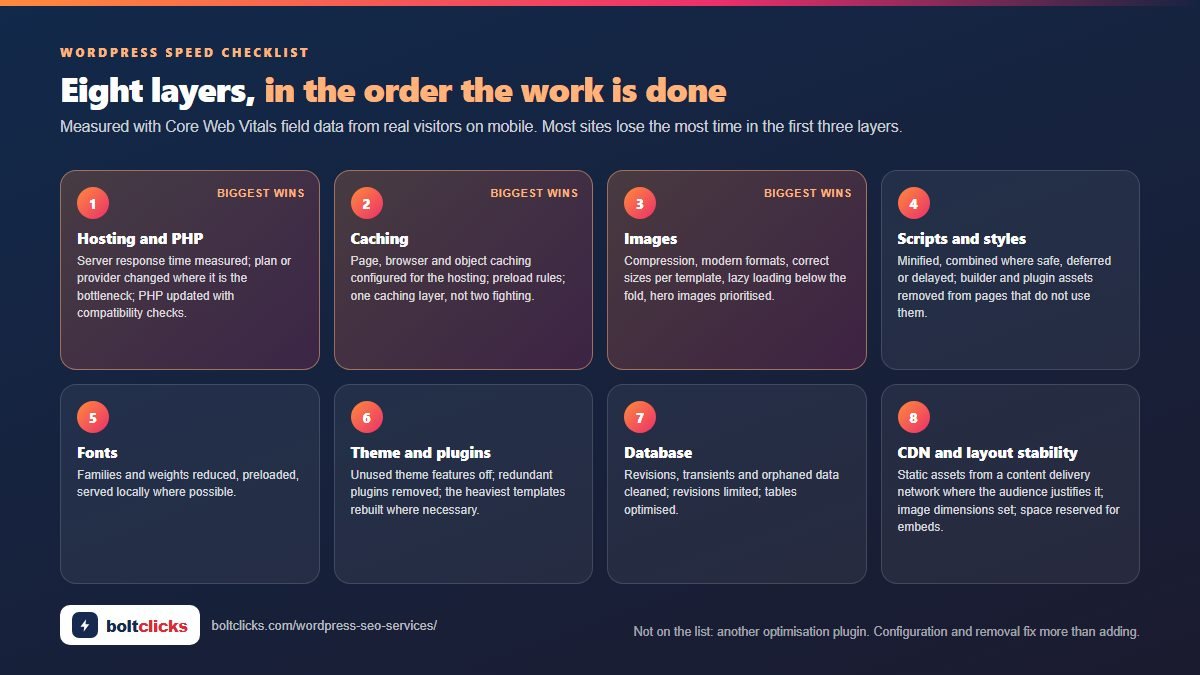
| Layer | Typical problem | What is done |
|---|---|---|
| Hosting and PHP | Shared hosting with slow response times; an outdated PHP version | Server response measured; hosting upgrade or move recommended where needed; PHP updated with compatibility checks |
| Caching | Caching plugin installed with defaults, or two caching layers fighting | Page, browser and object caching configured; preload and cache rules set; one caching layer |
| Images | Full-size uploads, no compression, no modern formats, no lazy loading | Compression, modern formats, correct sizes per template, lazy loading below the fold, hero images prioritised |
| Scripts and styles | Every plugin and the builder loading assets on every page; render-blocking code | Minified, combined where safe, deferred or delayed, removed on pages that do not use them |
| Fonts | Several font families and weights loaded from external servers | Font families reduced, preloaded, served locally where possible |
| Theme and plugins | Heavy theme features left on; redundant plugins | Unused features disabled, redundant plugins removed, heaviest templates rebuilt where necessary |
| Database | Years of revisions, transients and orphaned data | Cleaned and optimised; revisions limited |
| Content delivery network | Every asset served from one server to visitors worldwide | CDN for static assets where the audience justifies it |
| Layout stability | Images without dimensions, late-loading banners and embeds | Dimensions set, space reserved, embeds loaded on interaction |
What speed work is not: installing another optimisation plugin on top of the last one. Most slow WordPress sites have too many plugins already, and the fix is configuration, removal and, on the worst templates, rebuilding rather than adding.
WooCommerce SEO: product and category pages that rank and sell
WooCommerce turns WordPress into a store, and every WordPress SEO problem gets multiplied by the catalogue. Filter and sorting URLs create thousands of crawlable variations of each category. Product variations generate their own URLs. Product descriptions are copied from suppliers and shared with every other store selling the same thing. Category pages, the pages that should rank for the searches with buying intent, are often a grid of products with no text at all. And the cart, checkout and category templates are the heaviest on the site.
WooCommerce SEO starts with the categories: keyword research for each one, an introduction and buying guidance written for the searches it should win, internal links from guides and posts, and a structure that matches how customers narrow their choice. Product pages get unique titles and descriptions for the products that sell, with supplier text rewritten for the rest over time; product schema carrying price, availability, brand and reviews; image optimisation for galleries; and clear handling for variations and out-of-stock items. Technical rules keep filters, sorting and search out of the index while keeping the paginated category pages crawlable. Speed work concentrates on the templates that carry the money.
Category and product SEO
- Category pages with real content and internal links
- Unique product titles and descriptions in priority order
- Product schema with price, availability and reviews
- Variation, out-of-stock and discontinued product rules
- Breadcrumbs and site structure that mirror the catalogue
Technical WooCommerce rules
- Filter, sorting and search URLs excluded from crawling and indexing
- Paginated categories self-canonical and crawlable
- Cart, checkout and account pages noindexed
- Store templates optimised for speed
- Feeds for shopping placements aligned with the pages
WordPress SEO plugins: what you need, what you do not, and why defaults fail
An SEO plugin is necessary and not sufficient. It gives you control over titles, meta descriptions, canonicals, archives, sitemaps, breadcrumbs, redirects and schema, and it does none of the thinking. Its traffic-light scores measure keyword placement, not whether the page deserves to rank, and its defaults leave tag archives, attachment pages and media indexable on most installs. The service configures the SEO plugin properly, documents the settings, and then does the strategy the plugin cannot.
The wider plugin list is reviewed for the same reason. Every plugin adds code, often on every page, and many overlap: two caching plugins, three form plugins, a security plugin and a firewall doing the same job, a gallery plugin loading a slider library on pages with no gallery. The aim is the smallest set that does the job: one SEO plugin, one caching layer, one form plugin, one security approach, and the theme’s own features used before a plugin is added. Every removal is agreed with you first and checked on staging.
What a WordPress site needs
- One SEO plugin, configured for titles, archives, sitemaps, schema and redirects
- One caching layer, configured for the hosting
- Image optimisation, either a plugin or done at upload
- A backup method and a security approach
- A form plugin that loads only where forms exist
What usually needs removing
- A second SEO or caching plugin
- Slider, gallery and animation plugins loading site-wide
- Social sharing plugins that load external scripts everywhere
- Abandoned plugins that have not been updated in years
- “Optimisation” plugins stacked on top of each other
Content strategy on WordPress: pages first, posts in support
WordPress makes publishing easy, which is how sites end up with three hundred posts and five service pages that do not rank. The strategy reverses the priority: the pages that earn enquiries or sales get the research, the structure and the internal links first, and posts exist to support them, to answer the questions buyers ask before they choose, and to earn links and mentions. Keyword research is mapped to pages, categories and posts so that each search has one home, and the archive settings are set so that categories with real demand rank while tag archives stay out of the index.
Existing content is audited: posts that rank and convert are improved, posts that duplicate each other are merged, and posts with no purpose are removed and redirected. New content follows briefs that specify the intent, the structure, the questions to answer, the internal links and the schema. On WordPress, the templates are set up so that every post automatically carries the right structured data, breadcrumbs, author information and related links, which is where the platform’s flexibility pays off.
- Service, category and product pages researched, written and structured first
- Posts planned against the money pages, not against a publishing quota
- Content audit: improve, merge, remove and redirect
- Category strategy that ranks the archives with demand and hides the rest
- Templates that carry schema, breadcrumbs and author details on every post automatically
Hosting, security and updates: the maintenance decisions that move rankings
Three things outside the content affect WordPress rankings more than owners expect. Hosting decides server response time, uptime and how fast pages are for visitors in each country; a cheap shared plan can add two seconds before the page even starts to load. Security decides whether the site gets hacked, and hacked WordPress sites appear in search results with spam pages, pharmaceutical keywords and warnings that destroy trust and traffic for months. Updates decide whether a plugin or theme change silently breaks canonicals, schema, redirects or speed on a Tuesday afternoon.
The service reviews hosting and recommends changes with the evidence; sets out a security approach that covers logins, updates, backups and monitoring; and checks the SEO effect of every update on a staging site or immediately after deployment, so a broken canonical is caught in a day rather than discovered in the next traffic report. Maintenance is not sold as a separate package; the SEO checks after updates are part of the monthly work, and the report says what was updated and what was checked.
| Area | SEO risk | What the service does |
|---|---|---|
| Hosting | Slow response, downtime, distant servers for the audience | Measures response times, recommends the plan or provider that fits, configures caching for it |
| PHP and core versions | Outdated versions are slower and less secure; updates can break plugins | Version review, compatibility testing on staging, staged updates |
| Security | Hacked pages indexed; blacklisting; ranking loss | Login hardening, update discipline, backups, monitoring for injected content |
| Plugin and theme updates | Broken canonicals, schema, redirects, speed regressions | Post-update SEO checks; rollback plan |
| Backups and staging | No way to test or recover | Backup schedule confirmed; staging site used for every significant change |
| SSL and domains | Expired certificates, mixed content, wrong canonical host | Certificate monitoring, single canonical host enforced |
Migrating to WordPress, changing theme or builder, without losing rankings
Moving to WordPress from another platform, switching themes, replacing a page builder or restructuring a site are the moments when rankings are most often lost, because URLs change, headings change, speed changes and pages get dropped, all at once. The migration plan exists to keep every ranking the old site had and to fix what it lacked.
- BenchmarkEvery ranking, page, link and conversion recorded before anything changes, so losses can be traced to a URL.
- URL and redirect mapEvery old URL mapped to its new equivalent, including images, PDFs and archive pages that carry traffic; redirects tested one to one.
- Template reviewThe new theme or builder checked for heading structure, markup weight, schema output, internal links and speed before content is moved into it.
- Staging auditThe full site crawled on staging with search engines blocked: redirects, canonicals, sitemaps, schema, speed, internal links and content parity all checked.
- Launch checklistRedirects live, robots and indexing settings correct, sitemaps submitted, Search Console updated, analytics confirmed on launch day.
- Twelve weeks of monitoringDaily checks in the first two weeks, weekly after, against the benchmark, with any lost ranking traced and fixed.
WordPress SEO pricing, in pounds and dollars
Fixed fees, agreed in writing before work starts, month to month. Hosting, premium plugins or themes you choose to buy and any ad budgets are separate and paid by you directly; nothing is resold.
| Plan | What it covers | UK | US |
|---|---|---|---|
| Free WordPress SEO audit | Written summary of the technical, speed and content problems on your site and the competitor gap | Free | Free |
| SEO Foundation (one-off) | Full audit with the technical foundation fixed: archives, canonicals, sitemaps, redirects, schema, plugin configuration, core speed work | £850 | Quoted in USD |
| Starter: WordPress SEO | Ongoing SEO: technical monitoring, speed, on-page, content, links, local, weekly reports | £650 / month | $800 / month |
| Growth: SEO plus paid search | WordPress SEO with paid search run alongside, sharing keyword data and landing pages | £1,200 / month | $1,500 / month |
| Full Stack | Everything across SEO, paid search and paid social, with content and digital PR; WooCommerce stores at scale | from £4,000 / month | from $5,000 / month |
| Projects | Migrations, theme or builder changes, speed rescue, WooCommerce set-up reviews, agency white-label audits | Quoted | Quoted |
Terms: month to month, invoiced in advance, cancel with a month’s notice. Editor or administrator access to your own site, partner access to Search Console and analytics; passwords are never requested and everything stays in accounts you own. The full price list is on the pricing page.
WordPress SEO specialist, plugin alone, web developer or general agency
| Option | Strengths | Weaknesses | Typical cost |
|---|---|---|---|
| WordPress SEO specialist (this service) | Knows the platform’s traps and the SEO discipline; fixes technical, speed and content in one engagement; fixed fees; weekly written reports | Capacity is finite; enterprise multisite programmes need a team around the specialist | £650 to £4,000+ a month; $800 to $5,000+; projects from £850 |
| SEO plugin only | Control over titles, metas, sitemaps and schema; cheap | No strategy, no speed work, no technical diagnosis, no links; green lights are not rankings | £0 to £100 a year |
| Web developer or designer | Can change themes, templates and hosting; knows the build | Usually not an SEO specialist: archives left indexable, speed left to a plugin, no keyword or content strategy | £40 to £100 an hour |
| General SEO agency | Capacity for content and outreach; process | Often platform-agnostic: WordPress-specific problems missed or handed to “the developer”; packages; account managers | £1,000 to £10,000+ a month |
| Speed optimisation service only | Fast results on Core Web Vitals | Speed without structure, content or authority does not rank a site on its own | £150 to £800 one-off |
| In-house marketer with WordPress skills | Knows the business; always available | Rarely covers the technical layer; needs a specialist to escalate to | Salary plus tools |
How results are measured, and what to expect when
| Measure | Source | Why it matters |
|---|---|---|
| Indexed pages and coverage | Search Console indexing reports | Confirms the archive and URL clean-up worked and the right pages are in the index |
| Core Web Vitals field data | Real-visitor data by page group, mobile first | Speed as visitors experience it, not lab scores |
| Impressions, clicks and positions | Search Console by page and query | Visibility for the searches mapped to each page |
| Organic sessions and conversions | Analytics with conversion tracking on forms, calls and orders | The commercial result |
| Rankings for mapped keywords | Rank tracking with correct location and device | Leading indicator per page |
| Links and mentions | Backlink data and coverage tracking | Authority growth |
| Post-update health | Crawl checks after every plugin, theme and core update | Catches regressions before they cost traffic |
| AI answer visibility | Monthly checks of buying questions | Whether the business is named where customers now ask |
Speed and technical fixes show fastest: Core Web Vitals improve as soon as the changes deploy and field data catches up within a few weeks; indexation clean-up shows in Search Console within four to eight weeks. Rewritten pages in competitive markets take three to six months to settle. Authority compounds over six to twelve months. WooCommerce stores usually see category page gains before product page gains.
WordPress SEO by business type
Trades and local services
- Service and service-area pages built on clean templates
- Local business schema and Business Profile work
- Fast pages for mobile searchers
Professional services
- Service pages, expertise and author signals
- Guides and FAQs that answer client questions
- Clean archives so posts support rather than compete
WooCommerce stores
- Category-first strategy and product schema
- Filter and variation rules
- Speed on store templates
Healthcare and clinics
- Treatment pages and trust signals
- Compliance-aware content and reviews
- Local rankings per location
Publishers and blogs
- Content audits and consolidation
- Category strategy and internal linking
- Speed for ad-heavy templates
Web designers and agencies
- White-label WordPress SEO for client sites
- Launch checklists and audits
- Ongoing SEO under your name
Remote WordPress SEO for businesses in the UK, the US and anywhere
The work is done remotely, on UK and US hours, inside your own WordPress site with editor or administrator access you grant and can revoke, and with partner access to Search Console and analytics. Changes that could affect the live site are tested on staging first. There is no office in London or New York and none is claimed. Every week you receive a written report, and every question gets a direct answer from the specialist doing the work. If your site needs development work beyond SEO, a rebuild, a new theme or custom functionality, the websites service covers it, and the two are planned together so the build never undoes the SEO.
- Editor or administrator access to your site, never your personal password
- Staging for every significant change
- Weekly written report with before and after numbers
- Settings documented so any future developer can see what was configured and why
- Honest advice, including when the theme, the hosting or the offer is the real problem
Signs your WordPress site needs SEO help, not another redesign
Most business owners notice the symptoms long before they know the cause. The site looks fine, the web design agency delivered what was asked, the SEO plugin shows green, and yet organic traffic is flat, keyword rankings sit on page two, the bounce rate on mobile is high and the enquiry form is quiet. The list below is what a WordPress SEO audit usually finds behind those symptoms. If three or more apply, the problem is the SEO foundation of the site, and a redesign without fixing it will carry the same problems into a prettier template.
Traffic and ranking symptoms
- Organic traffic flat or falling in analytics while the industry grows
- Keyword rankings stuck on page two or three for the searches that describe what you sell
- Search engine results show tag pages, author pages or attachment pages from your site instead of the service pages
- Impressions in Search Console rising but the click-through rate falling, a sign of weak title tags and meta descriptions
- Competitors with worse websites outranking you in local search and the map pack
- Traffic that dropped after a theme change, a plugin update or a migration and never recovered
Speed and experience symptoms
- Load times above three seconds on mobile; visitors leaving before the page renders
- Core Web Vitals reported as poor or needing improvement in Search Console
- High bounce rates on landing pages from paid ads as well as organic search
- Layout jumping while the page loads; buttons that move as fonts and images arrive
- Twenty or more plugins, several doing the same job, and a page builder loading on every page
- Shared hosting with slow server response and no caching configured
Structure and content symptoms
- Hundreds of thin blog posts and a handful of service pages with two paragraphs each
- Several pages targeting the same keyword and competing with each other
- No clear site architecture: important pages four clicks from the homepage, no breadcrumbs, weak internal links
- Duplicate titles and meta descriptions across pages; missing or repeated H1 headings
- Product descriptions copied from the supplier; category pages with no text
- No schema markup, or schema output twice by the theme and a plugin
Business symptoms
- Leads and sales depend entirely on paid advertising; switching ads off stops the phone
- Potential customers cannot find the business for the products or services it sells, only for its name
- Reviews, case studies and expertise exist offline but nowhere on the website
- The website is not mentioned in AI-generated answers when customers ask for recommendations
- Nobody can say which pages bring enquiries, because conversion tracking was never set up
- Previous SEO packages produced reports full of vanity metrics and no measurable results
The WordPress SEO checklist used on every site
Every engagement works through the same checklist, adapted to the site. It is the difference between SEO best practices applied consistently and a list of tasks done once. The technical items come first because they decide what everything else can achieve; the content and authority items are where the growth comes from; the measurement items are how you know it worked.
| Area | Checklist items |
|---|---|
| Technical SEO audit | Crawl the whole site; check robots.txt, XML sitemaps, canonical tags, redirects, broken links, HTTPS, www and trailing slash consistency, pagination, archive and attachment settings, indexing rules for search results, feeds and parameters; verify Search Console ownership and fix every reported error |
| Website speed | Measure server response time, Core Web Vitals field data and lab scores on mobile and desktop; configure caching, image optimisation, script and style loading, fonts, database clean-up, lazy loading and a content delivery network; confirm fast loading on the pages that earn money first |
| Keyword research and search intent | Map target keywords to pages by search intent and search volume; identify relevant keywords for service, category, product and location pages; group long-tail and question searches for posts; check what ranks now and why |
| On-page SEO | Title tags and meta descriptions written for clicks; one H1 per page with headings that follow the content; body copy that answers the search; image optimisation with descriptive filenames and alt text; internal links to and from the key pages; clear calls to action |
| Site architecture | Every important page within three clicks of the homepage; logical categories; breadcrumbs; navigation that reflects how customers search; orphan pages linked or removed; URL structure that is short, readable and stable |
| Structured data | Organisation, local business, service, product, article, breadcrumb and FAQ schema output by the theme or SEO plugin; validated after every change; consistent business details across the site |
| Content strategy | Content audit of existing pages and posts; improve, merge, remove and redirect; editorial calendar for blog posts that support the money pages; briefs with intent, structure, questions and links; expertise and author signals in the templates |
| WooCommerce and ecommerce SEO | Category page content; unique product titles and descriptions; product schema with price, availability and reviews; filter, sorting, variation and out-of-stock rules; pagination; store template speed |
| Local SEO | Google Business Profile completeness, categories, services, photos, posts and reviews; local citations with consistent name, address and phone; location and service-area pages; local schema; tracking of map pack rankings for the searches nearby customers use |
| Off-page SEO and authority | Backlink audit; plan for high-quality backlinks from relevant sites; digital PR angles from your own data; brand mentions; directories and trade bodies worth being listed in; links to refuse |
| Conversion and tracking | Analytics with conversion tracking on forms, calls, chat and orders; Search Console connected; rank tracking with the correct location and device; key metrics defined; reporting that shows traffic and conversions, not vanity metrics |
| Security and maintenance | Login hardening, update discipline, backups, monitoring for injected content; PHP and core versions current; staging site for changes; post-update SEO checks; SSL certificate monitoring |
| AI search | Check AI Overviews, AI Mode and chat assistants for the buying questions in your market; clear entity information on the homepage and service pages; answer-ready sections; consistent business details across the web; monthly re-checks |
Working with your developer, designer or in-house team
Most WordPress sites have a history: a web design agency built it, a freelance developer added custom code, a marketing team publishes the blog posts and an in-house designer owns the brand. WordPress SEO works alongside all of them rather than replacing them. The specialist owns the SEO strategy and the technical diagnosis; the development team implements anything that needs custom code or template changes, with specifications written for them; the design team keeps the visual identity; the marketing team gets briefs, keyword targets and reviews for the content they write. There is no account manager between you and the person doing the work, and every recommendation comes with the reasoning, so your team learns why as well as what.
Where a site is being built from scratch or redesigned, the SEO work starts before the design process: keyword research shapes the site architecture and the navigation, the page templates are specified for headings, schema, speed and internal links, and the launch checklist is agreed with the development agency before the site goes live. That sequence costs far less than fixing an existing website after launch, and it avoids the usual outcome where a visually appealing new site loses the rankings the old one had. Agencies that build WordPress sites for their own clients can bring this in as a white-label service, with reports written for their client and the work delivered under their name.
- Specifications, not vague requests: every technical fix written up with the change, the reason, the acceptance test and the priority
- Briefs for writers: intent, structure, questions to answer, target keywords, internal links, word count and the examples to beat
- Clear communication: a weekly written report, direct answers to questions, and no jargon unless you want it
- Training where useful: your team learns how to publish, structure and link content so the site keeps improving between engagements
- Respect for the build: nothing is changed in a theme or custom code without the developer’s knowledge and a staging test
WordPress SEO for lead generation sites and online stores
The goal of SEO is not traffic; it is enquiries, bookings, orders and revenue. A lead generation site and an online store need different things from WordPress, and the strategy reflects it.
Lead generation websites
Trades, professional services, clinics, agencies and consultants sell a conversation. The site’s job is to rank for the searches potential clients use, prove expertise and trust quickly, and make the next step obvious. The work concentrates on service and location pages, local search, reviews and case studies on the site, calls to action on every page, fast forms that work on mobile, click-to-call, live chat or messaging where it suits the audience, and conversion tracking so every enquiry is attributed to a page and a search. Qualified leads, not sessions, are the number in the report.
- Service and service-area pages that rank and convert
- Trust signals: reviews, credentials, case studies, named people
- Forms, calls and chat tracked as conversions
- Cost per lead compared with paid advertising
WooCommerce and online stores
An ecommerce website sells through the customer journey from category to product to checkout, and SEO has to serve every step of it. Category pages are built to rank for the buying searches; product pages carry unique descriptions, product schema and reviews; guides and comparison posts capture the research stage and link to the products; and the checkout is fast and free of anything that stops an order. Online sales, average order value and revenue from organic search are tracked against the pages and searches that produced them, so the report shows sales, not just rankings.
- Category-first keyword targeting
- Product schema, reviews and stock handling
- Guides that feed the sales funnel
- Revenue from organic search in every report
Search engine optimisation, search engine optimization: the spelling changes between the UK and the US; the work does not. Both markets are served on their own hours, with keyword research done in the right country, currency and spelling for each.
What happens in the first ninety days of WordPress SEO
| Period | Work | What you see |
|---|---|---|
| Week 1 to 2 | Access set up, full audit, keyword research, competitor analysis, baseline of rankings, traffic, Core Web Vitals and conversions; roadmap agreed | The audit report, the roadmap, the first weekly report |
| Week 3 to 6 | Technical foundation: archives, canonicals, sitemaps, redirects, headings, schema, plugin configuration; speed work through the layers; tracking fixed | Search Console errors falling, faster pages in field data, cleaner index |
| Week 7 to 10 | Service, category or product pages rewritten in priority order; internal linking; local profile and citations; first content briefs or posts; outreach started | Early ranking movement on the rewritten pages; impressions rising for mapped searches |
| Week 11 to 13 | Second batch of pages; content published to plan; links and mentions arriving; post-update checks; quarter review and re-plan | Rankings, organic traffic and enquiries compared with the baseline; the plan for the next quarter |
What you should not expect in ninety days: page-one rankings for the most competitive searches in your market, or a WooCommerce catalogue of two thousand products fully rewritten. SEO compounds; the first quarter builds the foundation the later quarters grow on, and the weekly reports show exactly where the work is.
How to choose a WordPress SEO company, and the claims to be wary of
Choosing the right WordPress SEO company is easier when you know what to ask. Every provider says it delivers results, understands your business and has years of experience; the useful questions are the ones that produce specific answers about your site. Ask what the audit found, which pages will be worked on first and why, what will change on the theme and the plugins, how speed will be measured, who does the work and how you will know it worked. Then compare the answers with the list below.
Good signs
- A written audit of your actual site before a price, even a short one
- Specific WordPress knowledge: they can explain what your theme, builder and plugins are doing to speed and structure
- Field data, not lab scores, for speed; Search Console and analytics, not a dashboard of vanity metrics, for results
- Direct access to the person doing the work, with weekly written reports
- Fixed fees, month to month, and a straight answer about timelines
- Willingness to say the theme, hosting or offer is the real problem
Claims to be wary of
- Guaranteed rankings or guaranteed page-one results; nobody controls the search engine
- “Proven track record” and “team of experts” with no named person, no audit and an account manager between you and the work
- SEO packages priced before anyone has looked at your website
- Link building sold by the hundred, or “high-quality backlinks” from sites you have never heard of
- Another optimisation plugin as the answer to a slow site
- Reports that show keyword rankings and nothing about traffic, leads or sales
SEO also works best when it is planned with the rest of the marketing: paid search and paid social campaigns share landing pages and search-term data with SEO, email and social media reuse the content, and brand awareness work earns the mentions that build authority. A WordPress SEO specialist should be able to work together with your marketing agency, your designer and your developer rather than around them, and should tell you when another channel is the better first investment for the bottom line.
Local SEO, authority and AI search on WordPress
Local SEO on WordPress
For businesses that serve a place, the map pack decides the phone calls. WordPress makes location pages easy to create and easy to duplicate badly; the service builds location and service-area pages on a template that varies the content, adds local business schema per location, keeps the name, address and phone consistent with the Google Business Profile and citations, and connects reviews, photos and posts on the profile to the pages that convert.
Links and authority for WordPress sites
Authority is earned from sites that already have it. The plan sets which pages need links, what content will earn them, which publications, trade bodies, partners, suppliers and directories are realistic, and what to refuse. WordPress helps here: guides, tools and data pages can be published quickly on templates that carry the right structure, which makes outreach easier to win.
AI search visibility
AI Overviews, AI Mode and chat-based assistants now answer a share of buying questions with a shortlist of names. The service checks whether yours is among them and what the answers cite, then changes the WordPress site accordingly: clear entity information on the homepage and service pages, answer-ready sections, structured data output from templates, and business details that match everywhere.
Expertise signals in the theme
Search engines reward pages that show experience and expertise: named authors with credentials, dates, first-hand detail, original data and pages that answer better than the competition. On WordPress this is a template job as much as a writing job: author boxes, person schema, updated dates and related links are set up once and applied to every post.
WordPress SEO terms, defined
| Term | Meaning |
|---|---|
| Permalink | The URL structure WordPress uses for posts and pages; post-name structure is the SEO-friendly setting |
| Archive page | An automatically generated listing page for a category, tag, author or date |
| Attachment page | A page WordPress creates for each uploaded media file |
| Page builder | A visual editor plugin or theme feature that assembles pages from blocks and often adds markup and scripts |
| Caching | Serving stored copies of pages and assets so the server does less work per visit |
| Core Web Vitals | Google’s measures of loading, interactivity and visual stability, taken from real visitors |
| Lazy loading | Loading images and embeds only as they come into view |
| Canonical tag | The declared preferred URL of a page, used to resolve duplicates |
| Schema markup | Structured data describing a page’s content for search engines and AI systems |
| XML sitemap | A file listing the URLs you want crawled; should contain only indexable pages |
| Robots rules | Instructions telling crawlers which parts of the site not to crawl |
| Staging site | A private copy of the site used to test changes before they go live |
| Content delivery network | Servers around the world that deliver static files from near the visitor |
| WooCommerce | The most widely used ecommerce plugin for WordPress |
| Faceted navigation | Filters on category pages that create URL variations for every combination |
| Migration | A change of platform, theme, structure or domain that risks rankings if unplanned |
WordPress SEO services: frequently asked questions
What are WordPress SEO services?
Search engine optimisation delivered by a specialist who works inside WordPress: a WordPress SEO audit, technical fixes for the archive, media and URL problems the platform creates by default, site speed and Core Web Vitals work, SEO plugin configuration, on-page structure and schema, content strategy, WooCommerce SEO, migration protection and ongoing monitoring, priced as a fixed monthly fee with weekly written reports.
Is WordPress good for SEO?
Yes, when it is configured properly. WordPress gives full control over URLs, titles, headings, schema, sitemaps and content, and it is fast when the theme, plugins and hosting are chosen well. Out of the box, and with a heavy theme and twenty plugins, it creates duplicate archives, slow pages and structural problems. The platform is good; the defaults and most installs are not.
Do I still need an SEO service if I have an SEO plugin?
The plugin gives you settings; it does not give you strategy, technical diagnosis, speed work, content or links. Green scores in a plugin measure keyword placement, not whether a page deserves to rank. The service configures the plugin correctly and then does everything it cannot.
How much do WordPress SEO services cost?
Here, ongoing WordPress SEO starts at £650 a month in the UK and $800 a month in the US, £1,200 or $1,500 with paid search alongside, and from £4,000 or $5,000 for the full-stack plan. The one-off SEO Foundation project, which fixes the technical base, is £850. A free audit summary comes first. Full pricing is on the pricing page.
How long does WordPress SEO take to show results?
Speed and technical fixes show within weeks as field data catches up and indexation cleans up. Rewritten pages in competitive markets take three to six months. Authority compounds over six to twelve months. WooCommerce categories usually move before products.
Can you speed up my WordPress site?
Yes. Hosting and PHP, caching, images, scripts and styles, fonts, database, theme and plugin load and a content delivery network are worked through in order and measured with real-visitor Core Web Vitals data on mobile. The fix is usually configuration and removal rather than another optimisation plugin.
Do you work with WooCommerce stores?
Yes. Category-first keyword strategy, category page content, unique product titles and descriptions in priority order, product schema, filter, sorting and variation rules, pagination, out-of-stock handling and speed on store templates.
Will you need my WordPress password?
No. You create an editor or administrator user for the specialist, which you can remove at any time, and grant partner access to Search Console and analytics. Personal passwords are never requested.
Which WordPress SEO plugin is best?
Any of the established SEO plugins will do the job when configured properly; the choice matters far less than the configuration and the strategy. The service works with whichever plugin the site already uses unless there is a specific reason to change, and never runs two at once.
Can you fix a traffic drop after a theme change or update?
Yes. The diagnosis compares what changed, URLs, headings, speed, indexation, schema and redirects, against the drop by page and query, then repairs it. Most theme-change losses trace to changed URLs without redirects, lost headings and structure, or a much slower template.
Do you build or redesign WordPress sites?
SEO is the core service. Where a site needs a rebuild or development work beyond SEO, the websites service covers it and the two are planned together so the build supports the rankings.
Do you offer white-label WordPress SEO for agencies?
Yes. Web designers and agencies that build WordPress sites can have audits, launch checklists and ongoing SEO delivered under their own name, with reports written for their clients.
Where are you based?
The work is delivered remotely for businesses in the UK, the US and elsewhere, on UK and US hours. There is no office in either country and none is claimed.
Is there a contract?
Month to month, invoiced in advance, cancel with a month’s notice. Fees are agreed in writing before work starts and do not change without agreement.
Seven things to know before buying WordPress SEO
1. The platform is not the problem; the install is
WordPress ranks perfectly well. Heavy themes, stacked plugins, cheap hosting and default archive settings do not. Judge any proposal on whether it addresses the install you actually have.
2. Technical work comes first, and it is mostly invisible
Archive rules, canonicals, sitemaps, redirects, heading structure and speed decide what content and links can achieve. Expect the first weeks to be technical, and expect them to look quiet from the outside. The technical SEO service describes that layer in full.
3. Speed is measured with real visitors, not a score
Lab scores flatter sites that real users find slow. Ask for field data on mobile, by page group, before and after.
4. Fewer plugins, correctly configured, beats more plugins
Every plugin adds code, and most sites have several doing the same job. Removal and configuration fix more speed problems than any new plugin.
5. Pages earn money; posts support them
Three hundred posts and five thin service pages is the wrong way round. Service, category and product pages get the research and structure first.
6. Every update is a risk, so every update gets checked
A plugin or theme update can break canonicals, schema or speed in an afternoon. Post-update SEO checks are part of the monthly work, not an extra.
7. Sometimes the answer is a rebuild, and you should be told
A theme or builder that cannot be made fast, or a structure that cannot be repaired, is cheaper to replace than to patch forever. An honest recommendation on the first call is worth more than a year of workarounds.
Start with a free WordPress SEO audit
Send your website and the three searches you most want to win. You will get a written summary of the technical, speed and content problems on your WordPress site, the competitor gap and a straight answer on whether specialist SEO is worth funding, before any conversation about a plan. No jargon, no lock-in, no passwords.