
What does an SEO audit include?
What is actually inside an SEO audit, what the tools behind it can and cannot see, and how to judge the report once it lands. Written for somebody who has been quoted for one and wants to know what they should be getting. One specialist, working remotely from Lahore to UK hours.

Three different documents are sold under one word
If you have been quoted for an SEO audit, the first useful thing to know is that at least three different documents are sold under that word. Two quotes for “an audit” can be quotes for unrelated work, which is why the prices look irrational side by side.
The cheapest is an export. A crawler is pointed at the domain, it lists what it flags, sorted by a severity label the tool itself invented, and the list arrives as a PDF. It will reliably find broken links, redirect chains and duplicated titles, and it answers one question: what does this crawler flag on this site?
The middle version is a checklist pass. A person works a fixed list and records a pass or a fail against each check. It catches more, because a person can open the page and judge whether the heading describes the content, and it is repeatable.
The third is an investigation. It starts from a question about the business rather than the site — why did this stop growing, why does this template never rank — and treats the crawl and the platform data as evidence.
Signs of an export
- Scope described in URLs crawled, not questions answered
- Findings counted, and the count is the selling point
- Severity taken from a tool’s colour coding
Signs of an investigation
- You are asked what the site is meant to do commercially
- Findings carry evidence you can reproduce
- Some sections end in “cannot be determined”
The question worth asking a supplier is not what is included. It is which question the finished report will answer.
What a crawler can see, and what it cannot
The technical half of an audit begins with a fetch: a crawler requests pages, reads what comes back and follows the links it finds. The limits of that fetch are the limits of half the report.
Google’s own pipeline is not one step. Googlebot processes JavaScript in three phases — crawling, rendering and indexing — and Google states of the render queue: “The page may stay on this queue for a few seconds, but it can take longer than that.” An audit reading only raw HTML, or only rendered output, has looked at one phase and reports on all three — so ask which version was crawled.
The same territory produces the most misread instruction in these reports. Google states robots.txt “is not a mechanism for keeping a web page out of Google”, and that “a page that’s disallowed in robots.txt can still be indexed if linked to from other sites.” To keep a page out, Google directs site owners to noindex, password protection, or removing the page. A report telling you to disallow a page so it stops appearing has reached for the wrong tool.
- Settled by the crawl. Status codes, redirect chains, canonicals, the real internal link graph rather than the navigation menu, and what is in the sitemap versus what is reachable.
- Settled only once the page renders. Whether the main content, links and headings exist for a crawler that does not run your scripts.
- Not settled by any crawl. Whether the page answers the question it ranks for, whether the offer competes with the pages above it, and whether anyone who lands there does anything.
That third line is where disappointment with an audit tends to start. The crawl half is mechanical, and a discipline of its own, written up separately under technical SEO.
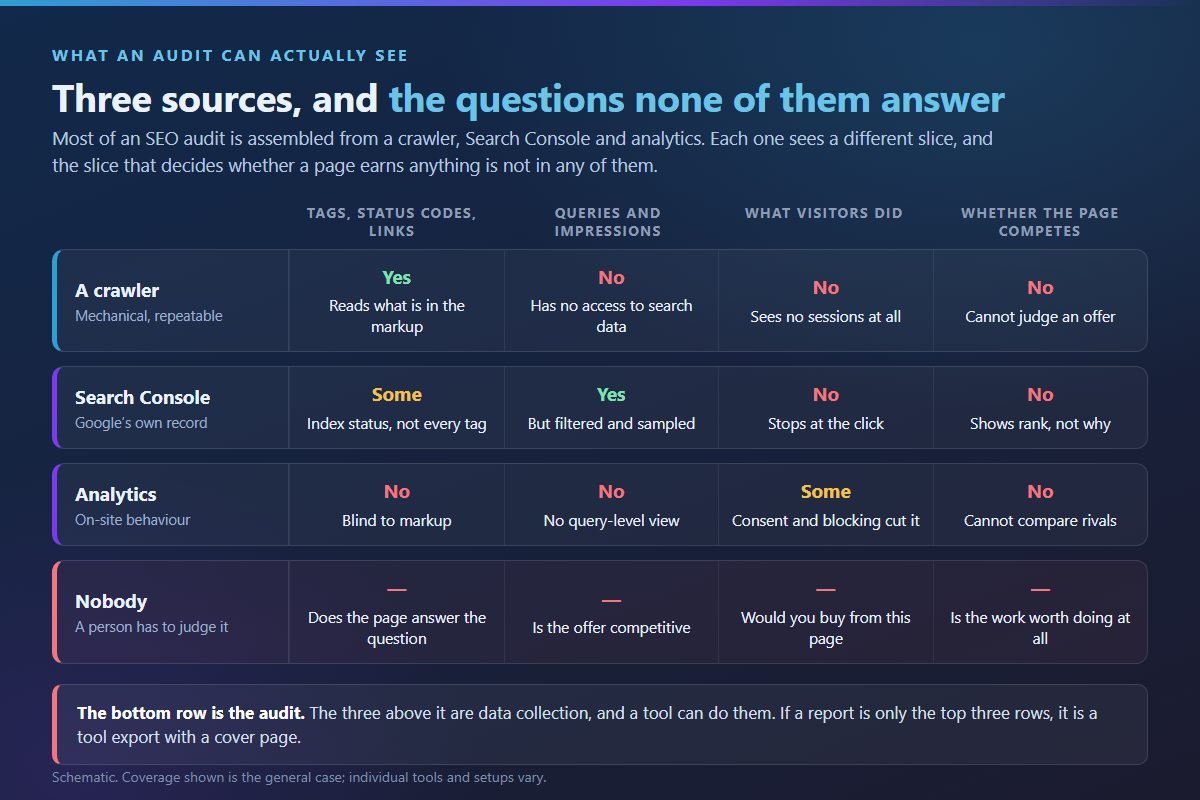
Where Search Console runs out, and what the gap hides
The second source is Google Search Console — the only place the search engine speaks to you directly, and the one most often quoted as though it were complete. Google documents the limits plainly.
| What gets quoted | Where it stops | Effect on a finding |
|---|---|---|
| The performance table | Google states: “Our tables can show a maximum of 1,000 rows, so some rows might be omitted.” | A precise count of the keywords you rank for describes a capped table, not the site |
| Query data | On the query tab, Google states, “anonymized (rare) results are omitted from the table, but are included in the chart totals unless a query filter is applied” — so table rows do not sum to the headline totals. Note the scope: this applies to the query tab. | A percentage dividing a table figure by a headline figure is wrong before it is typed |
| URL-level reports | Google states: “Most Search Console reports only cover a representative sample of URLs to assess quality of data, rather than a comprehensive listing of all known URLs.” | An indexation count is a sample and needs saying so |
| Recency | Google states that collected data should normally be available in two to three days | Today’s audit has not seen this week |
None of that makes the data untrustworthy. It makes precision suspicious. A finding phrased as a direction — impressions rising while clicks stay flat on this template — survives those limits. A finding phrased to two decimal places does not.
When a report quotes a number, the honest version names the tool and the date. Without both, you cannot check it later.
Why one page gets two different speed verdicts
Audits usually carry a speed section, and arguments about it often start from one confusion. Lab data is a simulation of a page load; field data is what happened to real people in Chrome. The gap is not rounding, and Google says where it bites: “Tools like Lighthouse that load pages in a simulated environment without a user cannot measure INP, as there is no user input.” That matters because INP became a stable Core Web Vital metric in 2024, taking over from FID. A report printing a lab score and labelling it “your Core Web Vitals” has skipped the metric it cannot see.
The thresholds are public: Google’s Web Vitals guidance sets LCP within 2.5 seconds, INP at 200 milliseconds or less, and CLS at 0.1 or less, assessed at the 75th percentile of page loads. That percentile is the part reports leave out, and the part that decides whether a page passes.
- The field window is fixed. PageSpeed Insights reports real-user FCP, INP, LCP and CLS over the previous 28-day collection period, so last week’s fix is barely visible in it.
- The data may not be about your page. Where a URL lacks sufficient real-user data, PageSpeed Insights falls back to origin-level granularity covering all pages of the site; where the origin also has insufficient data, PSI is unable to show any real-user experience data.
- Quiet pages may have none at all. To be included in the Chrome UX Report a page must be publicly discoverable and sufficiently popular, meaning it must have a minimum number of visitors. Google does not disclose the exact number.
For a small or new site, then, the honest finding is that field data is unavailable and the lab score is a hint, not a verdict.
The numbers analytics will not hand over
The third source is your analytics, which withholds rows of its own. Google states data thresholds are “applied to prevent anyone viewing a report or exploration from inferring the identity or sensitive information of individual users based on demographics, interests, or other signals present in the data”, and that where a report includes search query information, that row may be withheld if there are not enough total users.
Read that against the section above and a pattern appears. Search Console caps rows and samples URLs, analytics withholds rows on small numbers, field speed data disappears below a popularity threshold. Every source has a floor, and a small site sits close to all three at once — a reason to distrust an audit full of precise percentages, not a reason to skip one.
There is a ceiling too. Search Console keeps 16 months of data, which is why Analytics reports fed by it are also capped at 16 months. This sets a ceiling on any year-on-year comparison in a report. If a three-year search trend appears, ask where it came from.
A quick test: does the report ever say “unknown”? A document with none has not been near the edges of its own data.
Findings that fill reports and mean little alone
Some findings turn up in automated reports again and again, because they are cheap to generate. A flagged character count in a meta description is the mildest example: true, and not a conclusion. Three heavier ones are worth naming, because acting on them badly costs money.
- “Toxic backlinks — disavow recommended.” Google states: “In most cases, Google can assess which links to trust without additional guidance, so most sites will not need to use this tool”, and “If used incorrectly, this feature can potentially harm your site’s performance in Google Search results.” A default disavow recommendation hands you a risk and calls it a fix.
- “Add FAQ schema for rich results.” FAQ rich results are no longer shown in Google Search. Google’s documentation records that the feature stopped appearing on 7 May 2026, that the FAQ search appearance filter, the Search Console FAQ report and Rich Results Test support were removed in June 2026, and that the FAQ documentation itself has since been withdrawn. FAQPage remains a valid schema.org type; it no longer produces a rich result.
- “Crawl budget optimisation.” Google’s crawl budget guide names who it is for: large sites of 1 million+ unique pages with content changing about once a week; medium or larger sites of 10,000+ unique pages with very rapidly changing (daily) content; and sites with a large portion of their URLs classified in Search Console as “Discovered – currently not indexed”. If your site is smaller and slower-moving than that, this section is filler.
Mark every finding in a report that could have been produced without anyone opening the site. If that is most of it, you bought an export.
What an SEO audit cannot tell you
This is the part reports usually leave out, and the part that saves money. An audit has a defined reach, and several things owners want most sit outside it.
It cannot score you against a named algorithm. Google’s ranking systems guide describes its own scope as covering some of its more notable ranking systems, not all of them. And the systems people still ask to be measured against are no longer separate: the helpful content system became part of Google’s core ranking systems in March 2024; Panda became part of core ranking in 2015 and Penguin was integrated in 2016. None exists as a separate, checkable system, so a “helpful content score” is a tool’s opinion wearing Google’s name.
It cannot prove you did something wrong. On core updates Google writes that “restaurants that move down aren’t necessarily ‘bad’; there are just other restaurants that make your top 20.”
It cannot date your recovery. Google states that “some changes can take effect in a few days, but it could take several months for our systems to learn”, and notes that a site may have to wait for the next core update before improvement shows. Anything more precise is invented.
It cannot always rule out the platform. The Google Search Status Dashboard reports incidents across Crawling, Indexing, Ranking and Serving, publishing a start date and a duration for each, and offers RSS and JSON feeds. Checking it against the dates of a drop takes minutes.
Nor can it tell you whether the demand exists, whether your prices compete, or whether the enquiry form loses the sale. Those are answerable questions, but not by a crawl.
An audit narrows the field of causes. On its own it does not prove one.
What to specify before you pay for one
An audit can disappoint because it was under-specified rather than badly executed. The buyer asked what is included, got a list of topics, and the topics were duly delivered. Specify the shape of the deliverable instead, in writing.
- Name the question. One sentence describing what the report must be able to answer. Everything else is scope in service of it.
- Scope in templates, not pages. Which page types are in, which are out, and whether a sample or the full set is examined.
- Evidence per finding. The source, the date it was pulled, and a step you can repeat yourself.
- An owner and a rough effort. Developer, content, or configuration. A finding nobody can be assigned is a paragraph, not an action.
- A stated prioritisation rule. Not a colour. The rule by which one finding outranks another, so you can disagree with it.
- The exclusions. What was not examined, and what could not be determined from the data.
- A re-check date, and which findings get re-tested on it.
On access, Google’s advice is specific: for the initial audit stage, grant read access to Search Console rather than write access. Nothing needs changing in order to diagnose.
One more screen before signing. Google states: “No one can guarantee a #1 ranking on Google”, and warns against SEOs claiming a special relationship with Google or priority submission. A guarantee in the proposal tells you the specification above is not your problem.
If what you want is the investigation rather than the export, that is a different engagement, and how it runs is set out on the SEO audit consultant page.
Holding the finished report to the specification
When the document arrives, read it against the specification. Three passes settle whether the money did anything.
Count decisions, not findings. Mark every item you could act on this month without a follow-up question. That number, not the total, is what you bought. A report with hundreds of findings and a handful of decisions is a long document with a short report inside it.
Check three numbers at random. A figure with no tool and no date attached cannot be reproduced now or compared later, which leaves the agreed re-check nothing to measure against.
Test the most confident claim against Google’s documentation. The FAQ schema example is a good probe: anything still promising rich results from it is working from old notes.
To run the obvious checks yourself first, the free SEO checklist on this site exists for that — 75 checks, 8 sections, 14 pages, 0 paid tools. It will not replace an investigation, but it will tell you whether you need one. If you are weighing a one-off audit against ongoing work, the pricing page shows where the £850 SEO Foundation sits beside the monthly plans.
An audit is worth what you can act on afterwards. The rest of it is paperwork.
Eight questions about what an audit contains
Is a free SEO audit tool report the same thing?
It is the export described at the top of this page, and a genuine input to an audit. What it cannot do is decide which of the problems it lists matters, or judge whether a page answers its query.
How long should the report be?
Length is the wrong measure, because padding is easy to generate. Judge it by how many items you can act on without a follow-up question, and whether each carries evidence you can reproduce.
Should an audit include the fixes, or only the findings?
Either is legitimate, but settle it before you commission. Trouble starts when it is left vague: findings arrive with no owner attached and nothing moves.
Why do two audits of the same site disagree?
Usually because they read different things. One crawled raw HTML and the other rendered the page; one quoted lab speed data and the other field data. Ask which source a disputed finding came from.
Can an audit tell me why my traffic dropped?
It can narrow the possibilities and rule several out, but it cannot always prove one cause. Check the Search Status Dashboard against the dates first, and treat total confidence as a claim to test.
Does the auditor need access to Search Console and analytics?
For anything beyond a crawl, yes — without them the report is guessing at what people searched and did. For the audit stage Google advises granting read access rather than write access.
Does an audit cover content and links, or only technical issues?
Only what was specified, which is why it belongs in writing beforehand. Plenty of reports sold as full audits are technical crawls with a content section bolted on.
How often is one worth repeating?
A full re-audit on a fixed schedule is rarely the right instrument; re-checking the agreed findings on the agreed date tells you more for less. A fuller look earns its place when something structural changes — a redesign, a migration, new templates.
Have the audit done, or just have it checked
If you have been quoted for an audit and want a second opinion on the scope before you pay, send the proposal over. If you already have a report and cannot tell whether it was worth the money, send that instead. Either way you get a written answer, and there is nothing to sign.